The Reset Credits feature allows users to reset their consumed credits directly from the dashboard without contacting support. This helps ensure uninterrupted automation and gives users more control over their account usage.
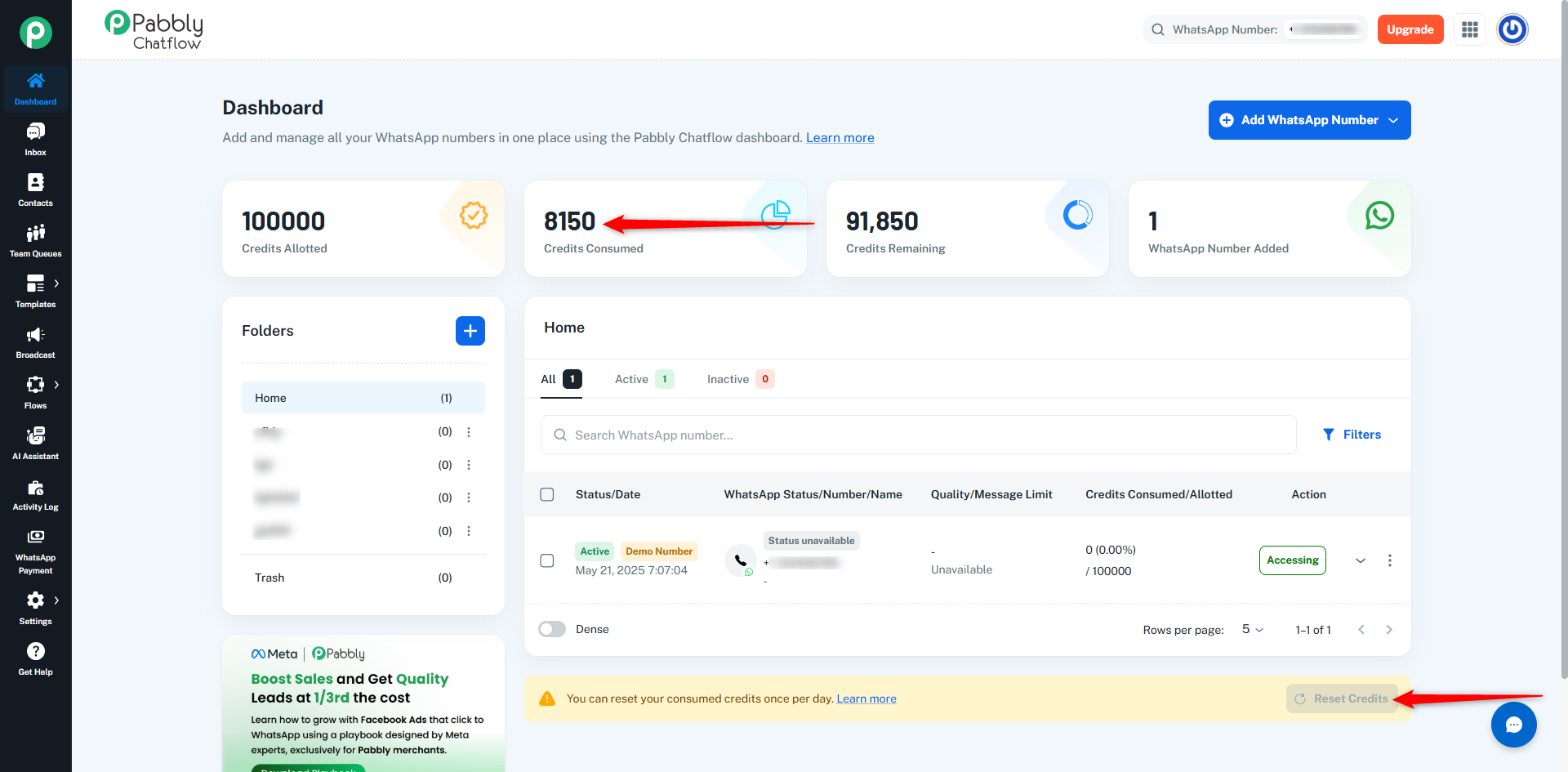
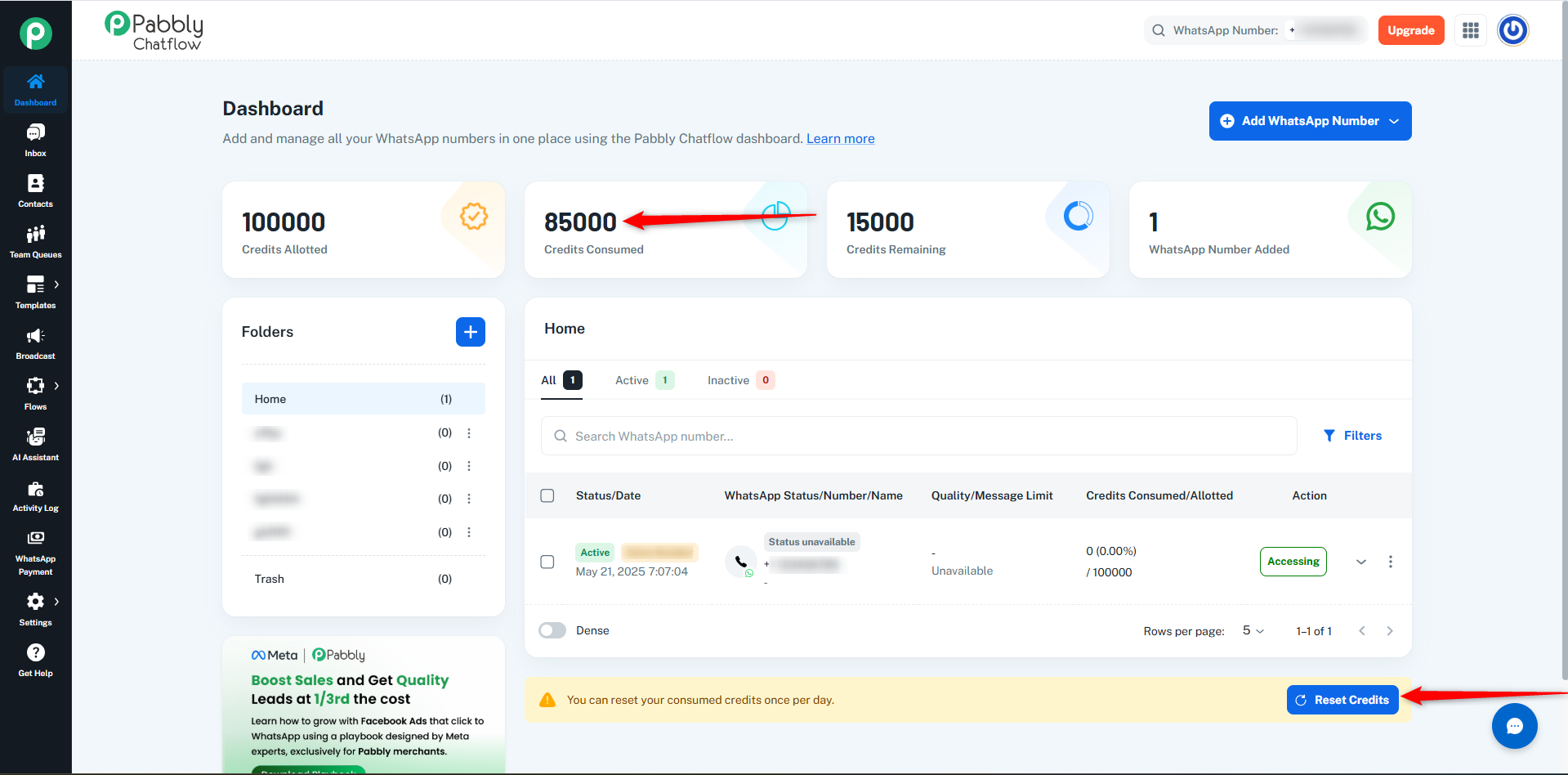
This option appears on the Dashboard page below the WhatsApp numbers table, as shown in the interface.
Availability
The Reset Credits feature is available only for users with the Unlimited Plan.
- The feature is visible only to Unlimited Plan users.
- Users without the Unlimited Plan will not see the Reset Credits option on the dashboard.
- The Reset Credits button becomes enable only after 80% of the allotted credits are consumed.
- Credits can be reset only once every 24 hours from the last reset.
How It Works
Follow these steps to reset credits:
- Log in to your Pabbly Chatflow account.
- Navigate to the Dashboard page.
- Scroll below the WhatsApp Numbers table.
- Locate the Reset Credits button.
- The button becomes enable when 80% or more credits are used.
- Click Reset Credits.
- The consumed credits will immediately reset to 0.
1. Feature Visibility
- Unlimited Plan users:
The Reset Credits option is visible on the dashboard.
- Users without Unlimited Plan:
The Reset Credits option does not appear.
2. Disabled State – Credit Usage Below 80%
If the consumed credits are below 80% of the allotted limit, the Reset Credits button remains disabled.
Example condition:
- Credits Allotted: 100,000
- Button activates when usage reaches 80,000 credits
Until then, users cannot reset credits.
3. Active State – Eligible for Reset
When 80% or more credits are consumed, the Reset Credits button becomes clickable.
Clicking the button will:
- Reset the consumed credits to 0
- Update the credit usage summary
- Display the last reset time in the alert.
Reset Limitations
The Reset Credits feature includes the following restrictions:
- Credits can be reset only once every 24 hours from the last reset.
- The feature is exclusive to Unlimited Plan users
- The feature is not available to team members
- Only the consumed credits are reset
- The total allotted credits remain unchanged
Example
| State |
Credits Allotted |
Credits Consumed |
| Before Reset |
100,000 |
85,000 |
| After Reset |
100,000 |
0 |
This shows that:
- The total allotted credits remain the same.
- Only the consumed credits are reset to 0 after clicking Reset Credits.
Benefits
The Reset Credits feature improves usability and workflow management by:
- Allowing instant credit reset without contacting support
- Preventing automation interruptions
- Giving users direct control over their credit usage
- Improving overall platform efficiency
 Pabbly Chatflow Team•Updated Oct 24, 2026•2 min read