Settings
 Pabbly Email Marketing Team•Updated Oct 24, 2026•9 min read
When you send emails through Pabbly Email Marketing, your sending earns or loses trust based on how clean it is — how many bounces it gets, and how many recipients mark it as spam. Pabbly uses this trust to set your daily sending limit.
You don't have to do anything special. The system runs in the background and adjusts your limit automatically. In short:
Send clean → you get to send more.
Send badly → you send less, or your sending is paused.
It works entirely on its own. Just send good emails to people who actually want them, and your limit grows over time.
Your account is always on one of four tiers. Each tier lets you send a percentage of your plan size per day:
Tier | What you can send each day |
|---|---|
Tier 1 (starting) | 10% of your plan |
Tier 2 | 25% of your plan |
Tier 3 | 50% of your plan |
Tier 4 (full) | 100% of your plan |
For example, on a 10,000-subscriber plan:
Tier 1 → 1,000 emails/day
Tier 2 → 2,500 emails/day
Tier 3 → 5,000 emails/day
Tier 4 → 10,000 emails/day
A note:
New accounts always start at Tier 1. You climb the ladder by sending cleanly.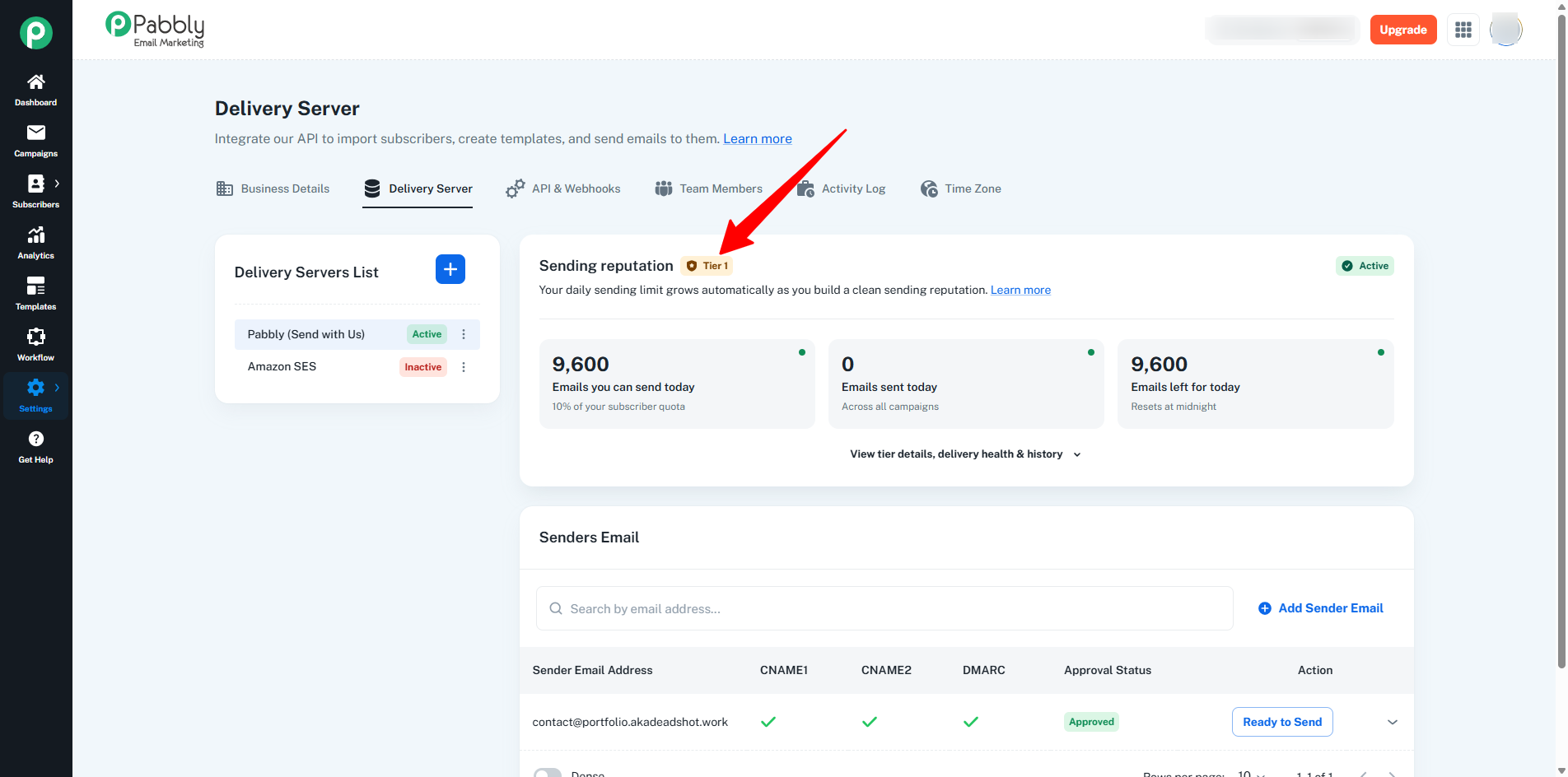
The system watches three simple signals on each tier:
Signal | What it is |
|---|---|
Hard bounce | The email permanently failed — usually because the address is bad or invalid. |
Soft bounce | The email temporarily failed — mailbox full, server busy, etc. |
Spam complaint | The recipient clicked "report spam" on your email. |
These are calculated as percentages of how many emails you sent in the current tier. The system uses the worst one to decide what to do.
These are good targets to aim for:
Hard bounce: under 0.5%
Soft bounce: under 2%
Spam complaint: under 0.1%
If all three stay healthy, you keep climbing tiers. If any one of them starts climbing into the higher-risk zones, your tier may freeze (no change) or drop. In critical cases, sending pauses.
Two things have to be true for the system to bump you up to the next tier:
You've sent to enough unique recipients in your current tier. The threshold is roughly 80% of your current tier's daily limit. For example, at Tier 1 of a 10K plan (1,000/day), that's about 800 unique recipients.
Your quality is healthy — bounce and spam-complaint rates all sit in the healthy zone.
Once both are true, the system upgrades you on its next pass — usually a few hours after your campaign finishes (the wait is so all the delivery and bounce signals can come in before the decision is made).
💡 Pro tip: Repeatedly sending to the same small group doesn't count toward the next tier. The system measures unique recipients so it can verify your list is healthy at real scale. Send to genuinely new, engaged people to advance.
If your quality slips:
Quality drifting into the warning zone → your tier doesn't change, but you'll get a heads-up email so you can clean things up before it becomes a real problem.
Quality drops further (danger zone) → your tier is reduced by one. Your daily limit decreases.
Critical-level issues → sending is paused entirely while the Pabbly team reviews. You'll be told why.
At Tier 1 (the lowest tier), there's no lower tier to drop to. So a warning or danger reading at Tier 1 just sends you a heads-up email — your daily limit doesn't change. Critical issues still pause sending though.
📈 Coming back up is easy. Clean your list, send to engaged subscribers, and the limit grows back automatically once your reputation is clean. The system rewards a comeback.
Some signals — especially spam complaints — arrive after the campaign has finished. The system handles this automatically. A late complaint is attributed back to the campaign that sent it, even if that was days ago. If late signals push the quality past a critical threshold, sending pauses (and your tier rolls back to where it was before that campaign).
In other words: you can't beat the system by sending early and hoping the bad news arrives too late to count.
Go to Settings → Delivery Server → Pabbly (Send with Us). The Sending Reputation Tier panel shows: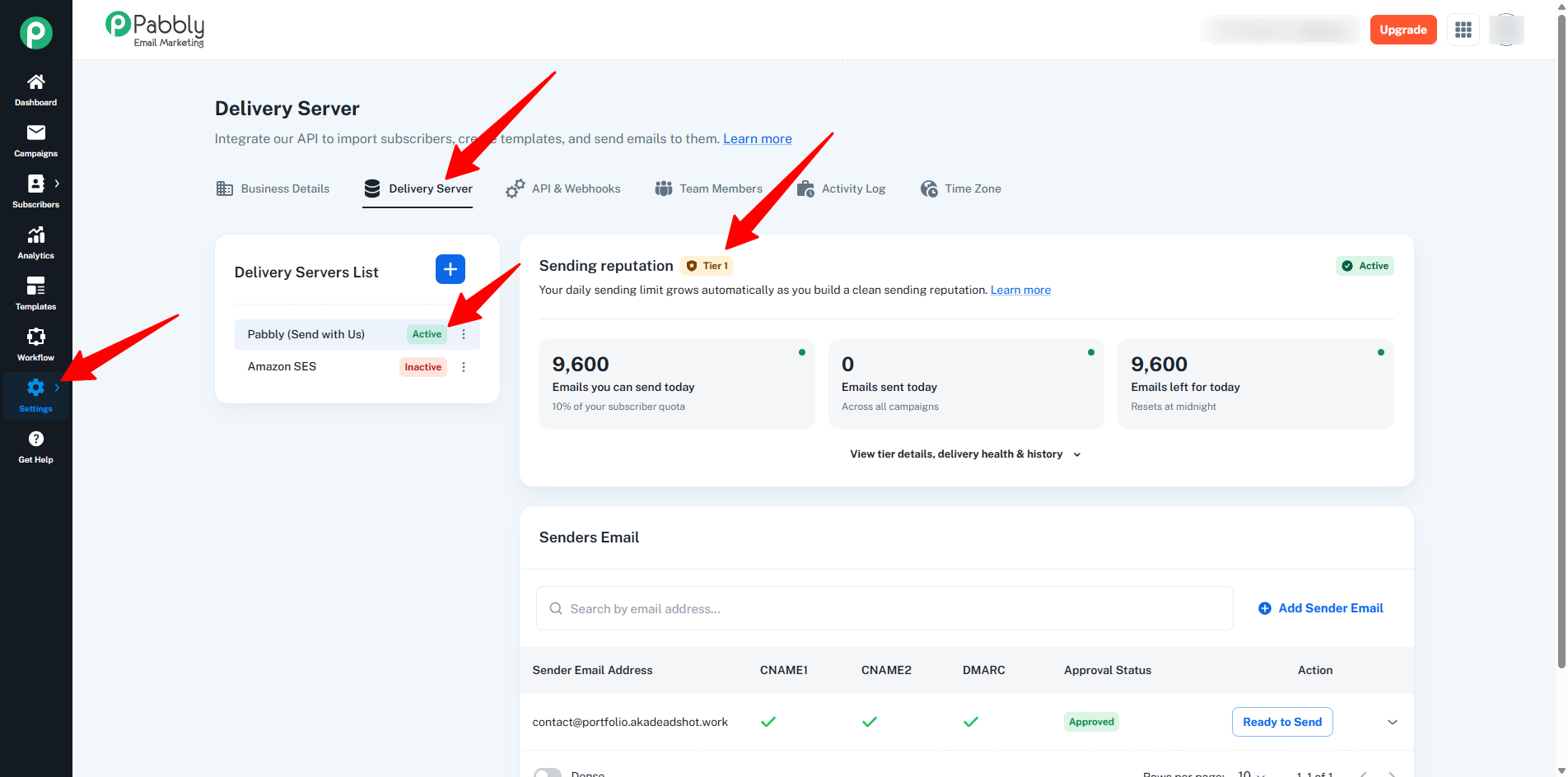
Your current tier (e.g. Tier 1).
A status pill on the right:
Active — healthy, sending freely up to your daily limit.
Holding — a quality signal is in the warning band; your limit is frozen.
Paused — sending is blocked while the team reviews.
A progress bar showing how close you are to the next tier (e.g. "56% complete").
A "Quality this tier" box with the live numbers: sent, delivered, hard bounces, soft bounces, spam complaints — each with a percentage.
A "Last change" card showing the most recent automatic adjustment in plain English, with the date — so you always know why your limit just changed.
You'll get a branded email whenever something changes. Each one tells you exactly why — the metric, the rate, and what to do next.
What happened | Email subject |
|---|---|
Your daily limit went up | "Your sending limit has been increased" |
Your daily limit was reduced | "Your sending limit has been temporarily reduced" |
Quality warning (no change in limit) | "Sending limit unchanged — please review your list health" |
Sending paused | "Your sending has been paused for review" |
Sending resumed | "Your sending has been resumed" |
When you upgrade or downgrade your plan, your daily limit adjusts automatically to match — we don't send a separate email about that. You'll see the new limit in your account.
Bought a bigger plan → your tier stays. The percentages just apply to the new (larger) plan size, so your daily limit goes up. (Example: at Tier 2 (25%) on a 5K plan, you sent 1,250/day; upgrade to 50K and you'll now send 12,500/day at the same tier.)
Downgraded to a smaller plan → your tier stays. The daily limit drops to match the smaller plan.
Cancelled / no active plan → flat 100/day. Your earned tier is remembered and restored automatically when you purchase a plan again.
A few habits that consistently keep accounts healthy and growing:
Send to opted-in, engaged subscribers. People who explicitly signed up are far less likely to mark you as spam.
Clean your list regularly. Remove hard-bounced addresses, never-openers, and clearly disengaged contacts.
Use double opt-in for new sign-ups. It eliminates fake / mistyped addresses.
Segment and personalize. Sending fewer, more relevant emails to the right people beats blasting your whole list with one generic message.
Honor unsubscribes immediately. Don't try to email people who've opted out — that triggers spam complaints fast.
Watch the "Quality this tier" panel. If a number is climbing into orange or red, address it before it becomes a problem.
Q: My limit just went down. Why? A: A recent campaign had a high bounce or spam-complaint rate. The exact metric and rate are in the email you got, and in the Last change card in your account. Keep sending clean campaigns and the limit recovers automatically.
Q: How fast does my limit go up? A: Once you've sent to enough unique recipients in your current tier with healthy quality, the system upgrades you on its next pass — usually within a few hours of your campaign finishing.
Q: I'm at Tier 4. Will I ever be downgraded? A: Tier 4 is the top — the system stops auto-upgrading. You can still be downgraded if quality drops significantly, or paused on a critical issue. Sending clean keeps you there.
Q: I bought a bigger plan. Did my tier reset? A: No. Your tier stays. The percentages apply to your new (bigger) plan size, so your daily limit goes up at the same tier.
Q: My account was paused. How do I get it back? A: The Pabbly team will review and unblock. Once unblocked, you start sending again. To avoid this happening again: review the email/account for the exact reason and clean your list before sending again.
Q: I'm on a free plan. Why don't I have a tier? A: Tiers only apply with an active paid plan. Free accounts get a flat 100/day. Purchasing a plan activates tiers immediately — and restores any tier you'd earned previously.
Q: Why does the system wait a few hours before changing my tier? A: Bounces and complaints take time to arrive. Making a decision too soon could give you the wrong answer (either upgrading when you shouldn't, or downgrading on a partial picture). A short wait makes sure the decision is fair.
Q: I send to the same loyal subscribers every week. Will I ever get to Tier 2? A: The system measures unique recipients in each tier, so you'll advance only when you actually send to new people. If your real audience is a small loyal list, you may stay at Tier 1 — and that's fine, because Tier 1 already covers what you actually need to send.
Every paid account is on Tier 1, 2, 3, or 4 — 10%, 25%, 50%, or 100% of your plan size.
The system automatically moves you up when you send to enough unique recipients with low bounces and low spam complaints.
It moves you down if quality slips, or pauses sending in critical cases.
You'll see your tier, progress, recent quality, and the latest change in Settings → Delivery Server → Sending Reputation Tier.
You'll get a clear email each time something changes, explaining exactly why.
Send to engaged, opted-in subscribers and keep your list clean — that's the whole formula.
That's it. Send cleanly → send more. The system does the rest.
