Campaign
 Pabbly Email Marketing Team•Updated Oct 24, 2026•8 min read
A code editor for creating emails by writing custom HTML and CSS.
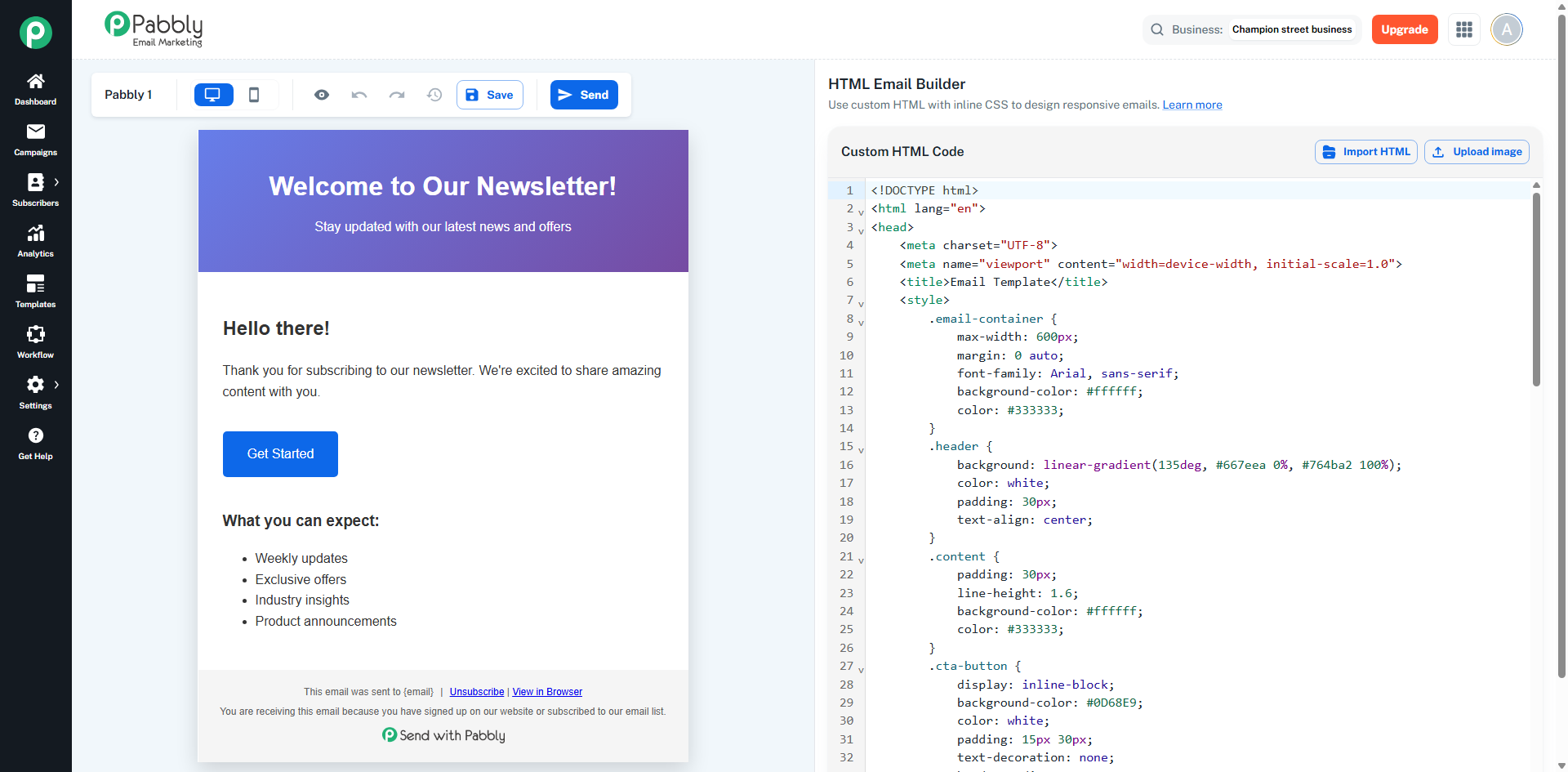
Code Editor (left side):
CodeMirror-based HTML editor with syntax highlighting.
Full HTML/CSS editing capabilities.
File manager integration for inserting images.
Default HTML email template provided.
Live Preview (right side):
Real-time preview of the HTML code
Rendered in an iframe showing how the email will appear
Auto-adjusts iframe height based on content
Full HTML Control: Write complete HTML structure with custom CSS
Syntax Highlighting: Color-coded HTML/CSS for easier editing
Live Preview: Real-time rendering of HTML code
Preview Modes: Switch between desktop (600px) and mobile (375px) views
File Manager: Insert images from media library directly into code
Default Template: Pre-built HTML email template with responsive structure
Code Validation: HTML structure validation and error detection
Provides full control over email HTML/CSS for advanced users who want to create custom-designed emails with their own code.
Goal: Ensure your emails look professional and render correctly across Gmail, Outlook, and Mobile.
Unlike modern websites, email clients (especially Outlook) cannot handle flexbox or grid.
Layout: Use <table>, <tr>, and <td> for all structures.
Width: Set your main container to 600px. This is the industry standard for readability and cross-platform compatibility.
Most email providers strip out <style> tags in the header.
Inline CSS: Apply styles directly to the element:
<td style="font-family: Arial; color: #333333;">...</td>
Spacing: Use padding on table cells. Avoid margin, as it is frequently ignored by Outlook.
System Fonts: Stick to "Web Safe" fonts like Arial, Helvetica, or Georgia. Custom web fonts (like Google Fonts) often fail to load.
Bulletproof Buttons: Don't use the <button> tag. Use a styled link (<a>) with plenty of padding to ensure it's easy to tap on mobile.
Hosting: Always use absolute HTTPS URLs (e.g., https://yourdomain.com/image.png).
Alt Text: Always include alt="Description" so users know what the image is if it's blocked by the email client.
Display: Add style="display:block;" to images to prevent unwanted gaps or "padding" added by Gmail.
Simplicity: A single-column layout is best for mobile responsiveness.
Dark Mode: Use high-contrast colors. Avoid using images with transparent backgrounds if they contain dark text, as they will disappear on dark backgrounds.
To prevent your emails from going to Spam:
Preheader: Use a hidden <div> at the very top of your code to control the "preview text" seen in the inbox.
Footer Requirements: You must include a physical mailing address and a clear Unsubscribe link.
File Size: Keep your total HTML file size under 100 KB to prevent Gmail from "clipping" the bottom of your email.
When creating HTML emails, you must follow specific rules because email clients (such as Gmail, Outlook, Yahoo, and Apple Mail) provide limited HTML and CSS support compared to web browsers.
The Pabbly HTML Email Builder validates your code and prevents saving or sending if critical rules are violated.
These issues must be fixed before you can save or send your email template.
Email clients block all JavaScript for security reasons. The following are strictly prohibited:
<script> tags (remove all script tags and their content)
Event handler attributes (onclick, onload, onmouseover, onfocus, etc.)
JavaScript URLs (href="javascript:...", src="javascript:...")
<script>alert('hello')</script> <a href="javascript:void(0)">Click</a> <div onclick="doSomething()">Click me</div>
<a href="https://example.com">Click</a>
The following HTML elements are not supported by most email clients:
Element | Reason |
|---|---|
| Blocked by all major email clients |
| Forms are not functional in emails |
| Use table-based buttons instead |
| Media playback is not supported |
| Requires JavaScript (not supported) |
| Blocked for security reasons |
<button>Click Me</button>
Why?
Not supported properly in Gmail
Breaks in Outlook
Many clients remove button styling
No reliable hover effects
In emails, we create fake buttons using tables + links.
This is called a Bulletproof Button.
<table align="center" cellpadding="0" cellspacing="0" border="0">
  <tr>
    <td bgcolor="#0D68E9"
        style="padding:12px 25px; background-color:#0D68E9;">
      <a href="https://example.com"
         style="color:#ffffff;
                font-family:Arial, Helvetica, sans-serif;
                font-size:14px;
                font-weight:bold;
                text-decoration:none;
                display:inline-block;">
        Get Started
      </a>
    </td>
  </tr>
</table>Email clients do not load external CSS files.
<link rel="stylesheet" href="styles.css">
<p style="color: #333333; font-size: 14px;">Your text here</p>
These issues will not block saving but may cause rendering inconsistencies in some email clients.
<style> TagsMost email clients have limited support for <style> blocks.
Only @media queries (for responsive design) should be placed inside <style> tags.
<style> @media only screen and (max-width: 600px) { .email-container { width: 100% !important; } } </style>
All other CSS should be inline:
<td style="padding: 20px; background-color: #ffffff;">
The following CSS properties are not widely supported:
display: flex (Flexbox)
display: grid (CSS Grid)
animation, transition
position: absolute | fixed | sticky
float
z-index
👉 Use table-based layouts instead.
Tables provide the most reliable layout structure across all email clients.
<table width="100%" cellpadding="0" cellspacing="0" border="0" style="max-width: 600px; margin: 0 auto;"> <tr> <td style="padding: 20px;"> Your content here </td> </tr> </table>
Only use fonts available across operating systems:
Recommended Fonts:
Arial
Helvetica
Georgia
Times New Roman
Courier New
Verdana
Tahoma
Trebuchet MS
Always include a fallback:
font-family: Arial, Helvetica, sans-serif;
Avoid:
Google Fonts
Custom web fonts (limited support in email clients)
Standard <a> buttons may break in Outlook. Use table-based buttons instead:
<table cellpadding="0" cellspacing="0" border="0"> <tr> <td align="center" bgcolor="#0D68E9" style="background-color: #0D68E9; border-radius: 5px; padding: 15px 30px;"> <a href="https://example.com" style="color: #ffffff; text-decoration: none; font-family: Arial, sans-serif; font-size: 16px;"> <span style="color: #ffffff;">Button Text</span> </a> </td> </tr> </table>
Important:
Wrap the button text inside a <span> with a color style. Outlook may override link colors, but it respects <span> styles.
bgcolor Attribute for OutlookOutlook may ignore background-color CSS.
Always use both:
<td bgcolor="#667eea" style="background-color: #667eea; padding: 30px;">
Margins are inconsistently supported in email clients.
<p style="margin: 20px;">Text</p>
<td style="padding: 20px;"> <p style="margin: 0;">Text</p> </td>
Always include alt text
Set explicit width and height attributes
Use style="display: block;" to remove image gaps
Host images on a reliable server
Use absolute URLs only
<img src="https://example.com/image.png" alt="Product Image" width="600" height="300" style="display: block; max-width: 100%;" />
Keep the maximum width at 600px
Use a centered container table with max-width: 600px
Use @media queries inside <style> tags:
<style> @media only screen and (max-width: 600px) { .email-container { max-width: 100% !important; width: 100% !important; } } </style>
For better compatibility, use table rows instead of <ul>/<li>:
<table cellpadding="0" cellspacing="0" border="0" width="100%"> <tr> <td style="padding: 5px 0 5px 10px;">• Item one</td> </tr> <tr> <td style="padding: 5px 0 5px 10px;">• Item two</td> </tr> </table>
Feature | Allowed | Not Allowed |
|---|---|---|
Layout |
|
|
Text |
| — |
Links |
|
|
Images |
|
|
CSS | Inline | External stylesheets |
CSS Properties | color, background-color, padding, font-family, font-size, text-align, border, width, height | flex, grid, animation, transition, position, float, z-index |
Responsive |
| — |
Interactivity | None | JavaScript, forms, event handlers |
Element | Protection |
|---|---|
Business Name | Text value cannot be changed |
Business Address | Text value cannot be changed |
Business Website | Link text and URL cannot be changed |
Unsubscribe Link |
|
View in Browser Link |
|
Sent with Pabbly Badge | Image/div with |
Footer itself |
|
Hiding CSS |
|
Dangerous properties on outer div | Cannot add |
Element | What you can do |
|---|---|
Footer background color | Change |
All other styles | Edit padding, font-size, color, margin, text-align, etc. |
Layout / order | Rearrange elements up/down within the footer |
"This email was sent to {email}" | Edit this text freely |
"You are receiving this email..." | Edit this text freely |
Unsubscribe link text | Change display text (e.g., "Unsubscribe" → "Opt out") |
View in Browser link text | Change display text |
Variables | Add template variables like |
| Allowed (only hiding-related |
Any CSS
nonevalue is allowed except ondisplay,visibility, andopacityproperties - those are blocked because they hide content.
