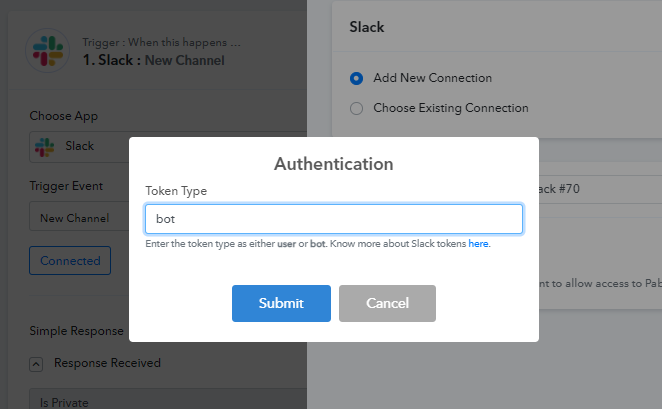
Authenticating Slack application in Pabbly Connect now requires entering token types based on different permission access.
You will be needing to enter the token type as either "
user" or "
bot".
With the token type as "
user", you will have the following permissions -
- Add Star
- Remove Star
- Invite a user to a Channel
- Send Private Channel Message ( With Image )
- Send Private Channel Message ( Without Image )
- Add Reminder
- Set Channel Topic
- Set Channel Purpose
- Update Profile
- Set Status
- Search Messages
- Archive a Channel
- Unarchive a Channel
- Remove User from a Channel
- Complete Reminder
- Delete Reminder
- List Reminder
- Create Text File
- Search File
- Add Reminder
- Get File
- Send Channel Message ( With Image )
- Send Channel Message ( Without Image )
- Send Direct Message ( With Image )
- Send Direct Message ( Without Image )
- Get User by ID
- List all Channels ( user token will list all public & private channels, Bot token only List Public channels )
- Send Channel message with the image using markdown
- Search User by Email
- Join Channel
- Leave Channel
- Delete File
- Delete Message
- Update Message
- Create Channel
With the token type as "
bot", you will have the following permissions -
- Send Channel Message ( With Image )
- Send Channel Message ( Without Image )
- Send Direct Message ( With Image )
- Send Direct Message ( Without Image )
- Get User by ID
- List all Channels ( user token will list all public & private channels, Bot token only List Public channels )
- Send Channel message with the image using markdown
- Search User by Email
- Join Channel
- Leave Channel
- Delete File
- Delete Message
- Update Message
- Create Channel
Learn more here about Slack Tokens here -
https://api.slack.com/authentication/token-types Pabbly Connect Team•Updated Jul 25, 2026•1 min read