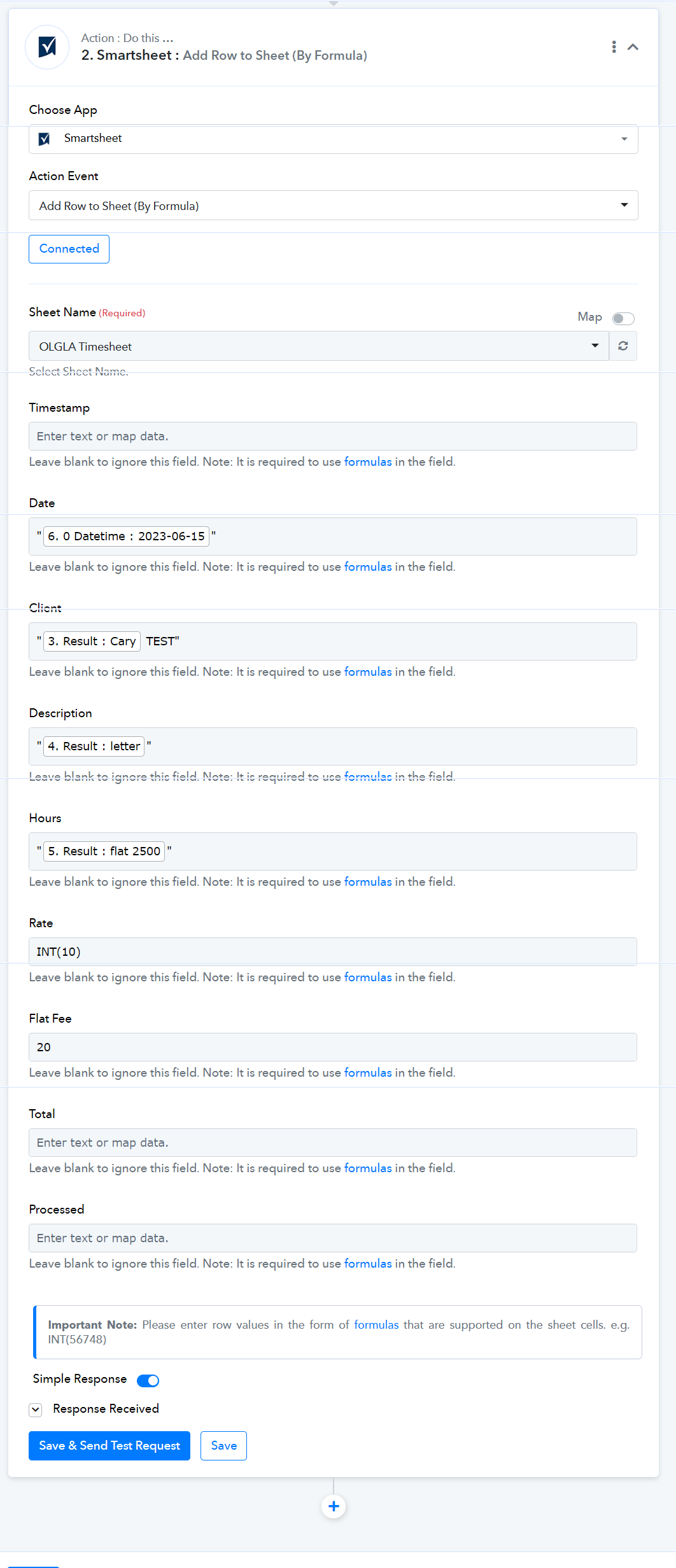
To incorporate the formula and add a new row to the sheet, use the following action:
Add Row to Sheet (By Formula)
Use Cases:
To send values to the cells of the newly added row, follow these steps:
- TEXT: Send simple text within the double quotes. e.g. "MyText"
- NUMBER: Send the number in the formula as mentioned. e.g. INT(3454)
- RANDOM FORMULA: Send the random formula as per user need. Refer to the provided documentation for further details and examples. Function List.
Note: Smartsheet encompasses familiar features commonly found in traditional desktop spreadsheet programs, along with a range of exclusive functions designed to assist with tasks unique to Smartsheet, such as working with data in a hierarchical list. These functions can be utilized within formulas to manipulate data, perform date-based addition or subtraction, and conduct various calculations. These capabilities are just a glimpse of the many tasks you can accomplish using Smartsheet's versatile functions. Pabbly Connect Team•Updated Jul 25, 2026•1 min read