Get Help and Support
If you are stuck, want to learn more, or have an idea for Pabbly Studio, help is just one click away on every page.
To get help, follow the steps below:
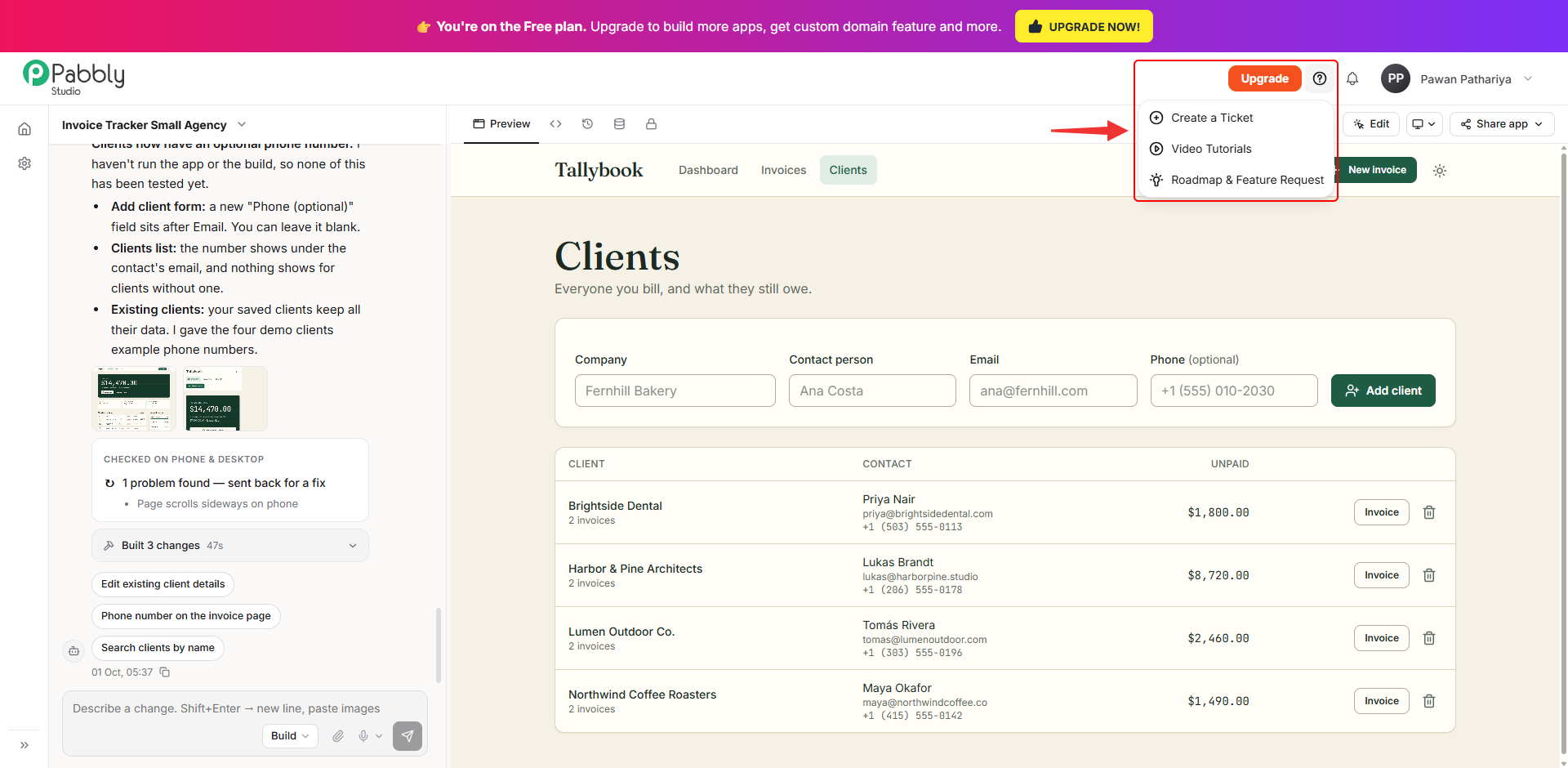
1. Open the Help menu. Click the ? (Help & support) icon at the top right of any Pabbly Studio page. The menu has three options:
- Create a Ticket - Ask our support team for help. This opens the Pabbly Studio section of the Pabbly forum, where you can post your question and follow the replies.
- Video Tutorials - Watch step-by-step videos on how to use Pabbly Studio.
- Roadmap & Feature Request - See what is planned for Pabbly Studio, suggest new features, or vote for the ones you want.
Tips for a faster answer when you create a ticket
- Include the name of your app and its link (from Share app).
- Describe what you asked Pabbly Studio to do, what you expected, and what happened instead.
- Add a screenshot if something on the screen looks wrong.
- If an earlier version worked, mention its version number from the Versions tab.
This is how you can get help and support in Pabbly Studio. If you still have any questions, feel free to reach out to us.
 Pabbly Studio Team•Updated Oct 1, 2026•1 min read